Physical AI
Introducing Dexter: An Articulated Asset Agent for Physical AI Simulators like NVIDIA Isaac Sim
1. Introduction
Dexter (short for dexterity) is an experimental agent I built that turns text or images into articulated assets for robotic simulation and model training. You describe or show an everyday object (a product photo, a sketch, a short spec), and Dexter works toward a simulation-ready model with separate moving pieces, sensible layout, and the description files simulators expect. The output is a URDF/USD package (part meshes, layout metadata, joint limits) that downstream tools such as NVIDIA Isaac Sim can import. The code is open source and free to use:  github.com/aakashvarma/dexter
Training a robot policy requires a lot of data: a robot performing tasks, with every sensor reading and joint command recorded. Robot-policy training companies like Physical Intelligence—and researchers working on the same problem—collect this by having a human teleoperator control the robot’s arms to demonstrate the desired actions. The robot watches, the human moves it, and the recordings stack up into training trajectories. (not π0)
Vision-language-action (VLA) models like π0 from Physical Intelligence take camera images and a language instruction as input, and output low-level motor commands. They are trained on large collections of robot teleoperation data across many tasks and environments. Think of training a humanoid to load a dishwasher: the robot needs to see the door open, watch the rack slide out, and understand where to place each dish. That is a lot of distinct object interactions that each need to be demonstrated.
This runs into two hard limits when you try to scale.
Physical world scalability. Setting up real kitchens, warehouses, or factory floors for data collection is expensive. You cannot cheaply replicate dozens of different environments, and each new one takes time to instrument and staff. Simulators and simulations address this: a virtual robot can run inside a physics engine, collect trajectories at simulation speed, and repeat across many environments at low cost.
Simulation setup time. Scaling simulation creates a second bottleneck. Every interactive object in the scene (the dishwasher, the cabinet, the appliance) needs a 3D model broken into moving parts with correct joint definitions. That work is currently done by hand, and it does not scale.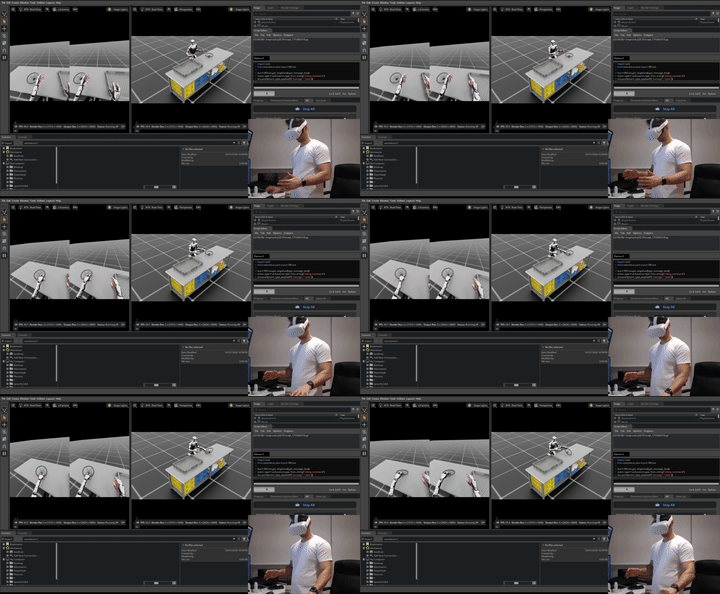 Teleoperation inside an NVIDIA Isaac Sim environment.
Recent image-to-3D models such as Hunyuan3D, SAM3D, and similar can generate a 3D mesh from a photo in minutes. But they output a single solid shape with no moving parts. A dishwasher generated this way is one fused block; you cannot open the door or pull out the rack in simulation.
Dexter targets that second bottleneck. Given a reference image, it produces an articulated asset: individual part meshes, a kinematic tree, joint definitions, and a URDF/USD file a simulator can load. The goal is to remove the manual work of building interactive simulation objects so simulation can scale the way simulators already let training scale past the physical world. In the longer run, the hope is that Dexter evolves into something that builds complete simulation scenes end-to-end, with multiple articulated assets placed and connected from a single environment description. Version 0, described here, tackles one object at a time.
This post explains why articulated assets matter for manipulation and VLA work, then walks through version 0 of Dexter as it exists today: how the agentic loop is wired, and the generation of an articulated asset dishwasher.
2. Background
2.1 Articulated Assets and Simulator Formats
A physics simulator does not only need a pretty mesh. It needs to know which pieces are rigid, how they are attached, and what motion is allowed between them. When you pull a dishwasher rack forward, the simulator updates a slide joint, not the whole appliance sliding across the kitchen floor. When the door drops open, it rotates on a hinge joint. That is the difference between a prop and an object you can actually interact with in sim.
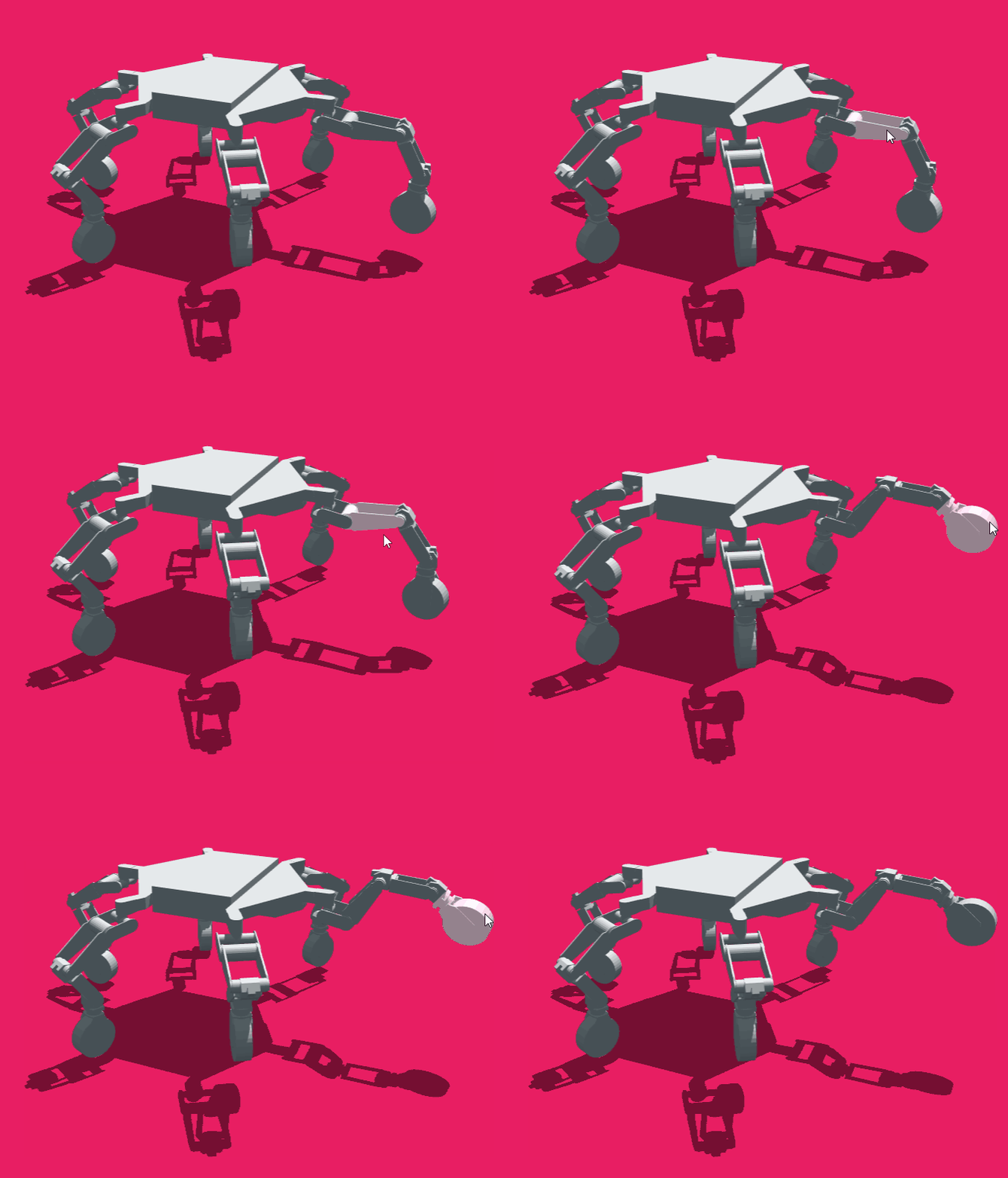
An articulated asset is many rigid links (chassis, legs, door, rack) connected by joints; motion changes joint angles or slides, not a single frozen mesh. The hexapod below is a familiar example: each leg swings at its hinges while the body stays one rigid piece:
Simulators require this structure in a machine-readable format. The two most common are URDF and USD.
URDF (Unified Robot Description Format) is an XML format used widely in robotics. Each rigid part is a <link> with a mesh file; each connection is a <joint> with a type, axis, and limits. A minimal dishwasher example:
<robot name="dishwasher">
  <link name="body">
    <visual><geometry><mesh filename="body.obj"/></geometry></visual>
  </link>
  <link name="front_door">
    <visual><geometry><mesh filename="front_door.obj"/></geometry></visual>
  </link>
  <joint name="front_door_joint" type="revolute">
    <parent link="body"/>
    <child link="front_door"/>
    <axis xyz="1 0 0"/>
    <limit lower="0" upper="1.57"/>
  </joint>
</robot>
body and front_door are separate links with distinct meshes. front_door_joint is a revolute joint between them, with rotation capped at roughly 90 degrees. A complete asset adds rack links, collision geometry, and precise link offsets.
USD (Universal Scene Description) is the scene format used by NVIDIA Isaac Sim via Omniverse. Articulation is expressed as a prim hierarchy: Xform prims for rigid parts, and PhysicsRevoluteJoint or PhysicsPrismaticJoint prims for joints. USD also supports materials, lighting, and multi-object scenes in one file, which makes it better suited for full environment assembly.
Dexter targets both formats. See §2.3 for how Isaac Sim imports them.
2.2 Why This Matters for Robot Training
Most real-world manipulation tasks involve objects that move in constrained ways: a dishwasher door swings open, a drawer slides out, a microwave latch releases. The task is not complete when the robot touches the object; it is complete when the object changes state. A simulation built from static meshes cannot represent that. The robot can reach toward the door, but there is no joint to actuate, no state to change, no success signal to measure.
This matters for VLA training in a concrete way. A model like π0 from Physical Intelligence is trained on thousands of teleoperation trajectories across many tasks, including ones that require opening, loading, or operating articulated household objects.A vision-language-action model takes camera frames and a language instruction as input, and outputs motor commands—one action chunk per inference step. If you are familiar with LLMs, the structure is recognizable: a transformer backbone processes a sequence of tokens and produces an output. In a VLA, those tokens include visual patches (from ViT encoders) and language tokens, and the output is not the next word but a sequence of continuous joint positions and velocities the robot executes at control rate. The same properties that matter in LLMs—scale, diverse training data, strong pretraining priors—transfer here too, because the backbone is largely the same. What differs is that the output head decodes into robot action space, not a text vocabulary.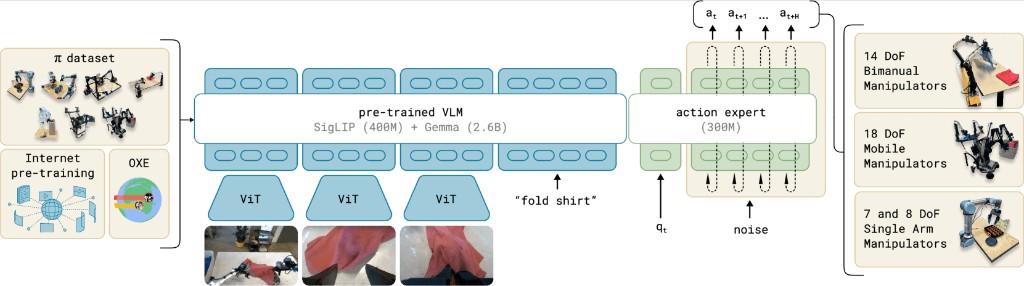 π0 architecture. Three ViT encoders process camera frames into visual tokens. A pre-trained VLM (SigLIP 400M + Gemma 2.6B) fuses those tokens with the language instruction. A separate 300M action expert takes the VLM output, the current joint state qt, and a noise sample, then decodes a continuous action chunk at…at+H via flow matching. Trained across 14-DoF bimanual, 18-DoF mobile, and 7/8-DoF single-arm platforms.
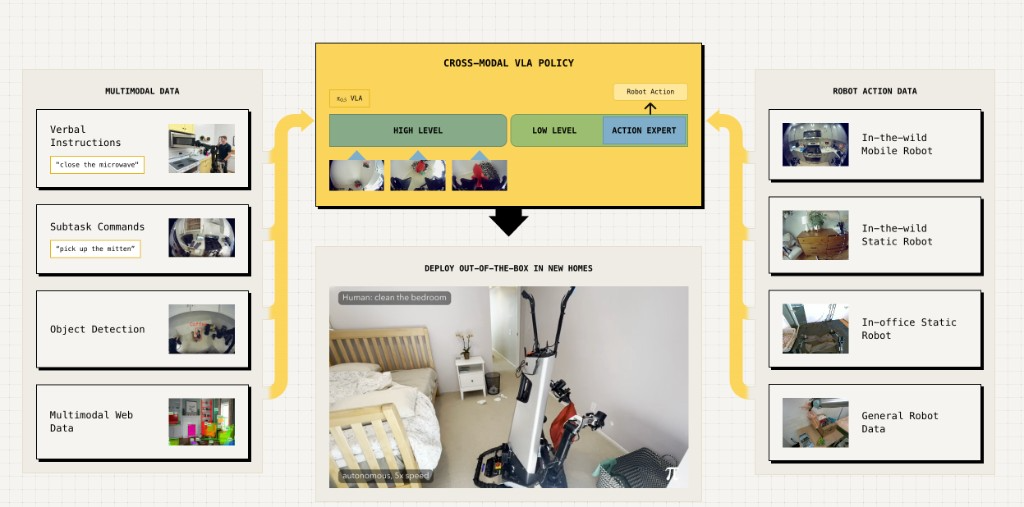 π0.5 co-training. π0.5 extends the same backbone by co-training on heterogeneous sources: in-the-wild mobile and static robot data, verbal instructions, subtask commands, object detection labels, and multimodal web data. The policy operates at two levels—a high-level semantic step is predicted first in text, then the same model conditions on it to output low-level motor commands. This curriculum is what enables deployment in homes never seen during training. pi.website/blog/pi05 ↗ When that training moves (even partially) into simulation for scaling or evaluation, the simulator needs objects with the same interactive structure the real hardware encounters.
The practical bottleneck is scaling the creation of articulated assets. Robot-policy training companies and researchers need many distinct articulated object instances across categories, not one perfectly tuned dishwasher used a hundred times. Variety in geometry, joint placement, and proportions is what makes a policy generalize. Building each of those assets by hand does not scale.
2.3 Isaac Sim and Related Simulation Stacks
NVIDIA Isaac Sim is the primary downstream target for Dexter’s output. It runs on NVIDIA Omniverse and uses PhysX for rigid-body dynamics, with integrations for ROS 2 and training stacks like Isaac Lab. Dexter does not run inside Isaac Sim—it produces the URDF/USD packages that Isaac Sim imports.
When a URDF or USD is imported, Isaac Sim reads each link as a rigid body and each joint as a controllable degree of freedom in a kinematic tree. The result is an articulation: a single simulated mechanism where joints can be driven independently. After import, joint drives, limits, and damping are typically tuned so the asset behaves as expected in physics. A URDF/USD is a starting description; some follow-up tuning is normal. In v0, joint motion is validated in a lightweight physics viewer with sliders before any Isaac Sim work begins.
Other simulation stacks are relevant context for where Dexter fits:
- Genesis AI (Genesis World) is a broadly supported simulation stack with APIs for URDF, MJCF, GLB, USD, and more. Like Isaac Sim, it consumes structured assets—it does not generate them from images.
- Moonlake AI tackles a similar problem—simulation infrastructure for articulated assets, with stated support for Isaac Sim and Unreal Engine. Dexter aims at the same problem class but as an open-source pipeline.
2.4 Where Dexter Fits
The introduction described two hard limits on scaling robot training data. Simulators address the first—physical world scalability—by letting robot-policy training companies and researchers run environments in simulation instead of the physical world. Dexter addresses the second: automating the creation of the interactive simulation assets those environments require.
Input. A reference image of a single object (e.g. a product photo).
Output. URDF or USD files and everything needed to load them: per-part meshes, joint definitions, layout metadata, collision geometry, and physics properties.
Downstream. Robot-policy training companies and researchers building simulation environments and training datasets who need interactive, physics-accurate objects in sim—not a replacement for NVIDIA Isaac Sim, Genesis World, or VLA training pipelines.
Longer-term direction. The current scope is one object per run. The goal is for Dexter to eventually build complete simulation scenes end-to-end: multiple articulated assets placed and connected from a single environment description, so building a sim environment becomes less of a hand-crafting task.
3. Dexter Version 0
v0 is an experimental pipeline. The assets it produces are a starting point; joint tuning in Isaac Sim or equivalent is expected before production use.
3.1 Pipeline Overview
Dexter v0 runs through OpenCode, a coding agent harness.A coding agent harness is a control loop around an LLM: given a goal, it decides which tools to call, what context to read, how to update state, and when to stop. The model is the engine; the harness is the system that drives it. Claude Code and Codex CLI are familiar examples. See Raschka (2026) for a detailed breakdown of the components. magazine.sebastianraschka.com ↗ You talk to an orchestrator agent. It reads your image, calls specialist agents when judgment is needed, runs deterministic tools for everything else, and pauses twice so you can review the result before expensive steps continue.
Judgment-heavy work sits with two subagents—the analyze subagent, which reads the photo and names the moving parts, and the critic subagent, which compares rendered views to the source and suggests layout fixes. Everything in between—image generation, mesh export, placement math, Blender assembly, rendering—is handled by tool scripts the orchestrator invokes. Subagents never talk to each other; the orchestrator passes state between them.
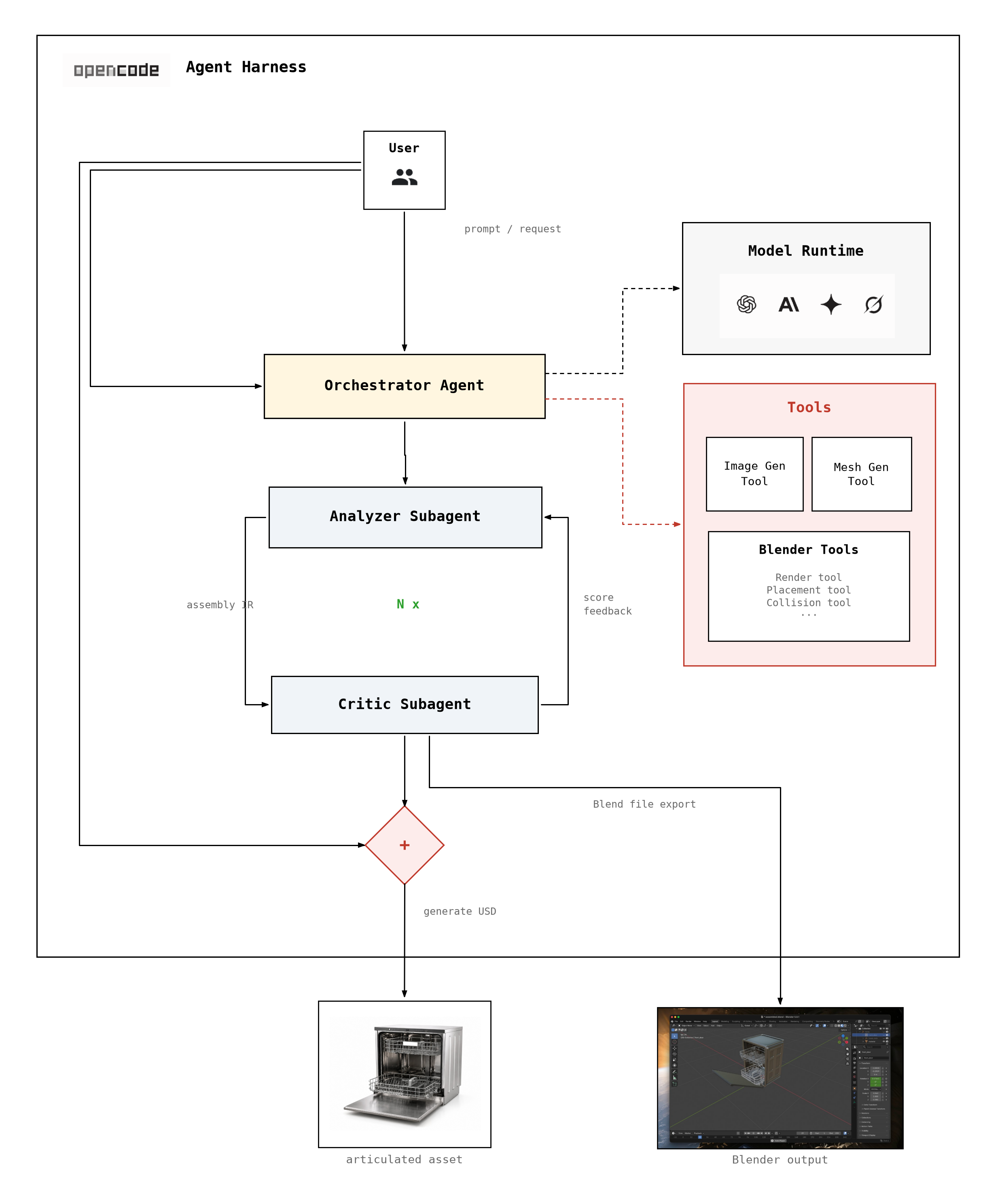
The pipeline runs in seven steps:
- Name the parts. The analyze subagent studies the source image and breaks the object into moving parts—a cabinet body, a door, racks, drawers, and so on. For each part it records a name, a short description, how it connects to its parent, and a joint type (fixed, revolute, prismatic), along with initial size and pose estimates.
- Review the part list. Before any 3D generation begins, the orchestrator stops at the first human gate. You confirm that part names make sense and joint types match what you see in the photo.
- Build a mesh for each part. After approval, the orchestrator generates one isolated render per part and runs image-to-3D on each, producing a separate mesh for every moving piece.
- Place parts in the scene. A deterministic placement step combines the part list with mesh measurements to build the first layout—position, rotation, and scale for each piece in 3D space. No LLM is involved here; it is pure geometry.
- Render, score, and refine. The placement ↔ critic loop begins. Each round, Blender assembles the meshes and renders diagnostic views. The critic subagent compares them to the source photo and scores the layout. Corrections feed into the next round. Parts that look correct are locked; the orchestrator keeps the best-scoring iteration even if a later round regresses. The loop stops when the score is good enough, a maximum round count is reached, or progress stalls.
- Approve the layout. The orchestrator pauses at the second human gate. You review renders from the best iteration and the assembled scene in Blender.
- Export for simulation. After approval, the orchestrator exports a USD package—meshes, textures, and joint definitions—ready to load in Isaac Sim or similar tools.
The recording below is a full v0 run on a refrigerator reference image—part identification, both human gates, image-to-3D, the placement ↔ critic loop, and export—captured end to end in the OpenCode harness.
3.2 Dishwasher Run
The following traces a complete v0 run on a product photo of a dishwasher.
Step 1: Part identification. The analyze subagent read the reference image and proposed four moving parts: body, front_door, upper_rack, and lower_rack. After human approval of the parts IR, the run continued.
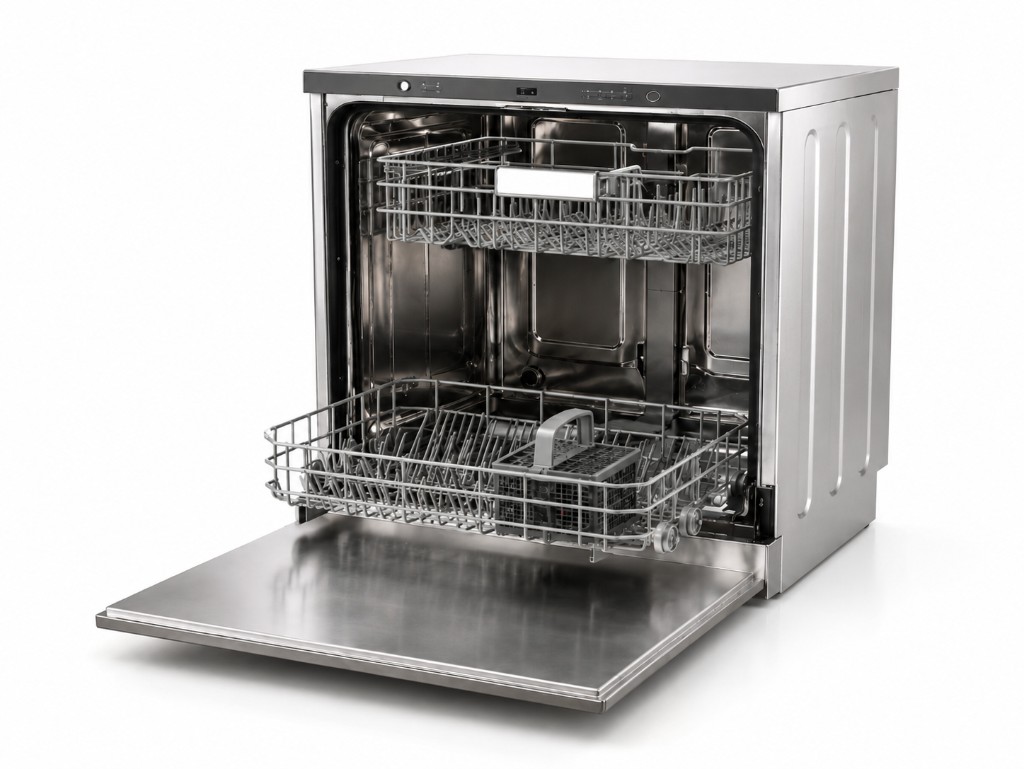
Step 2: Part renders. The orchestrator generated one isolated, white-background render per part.
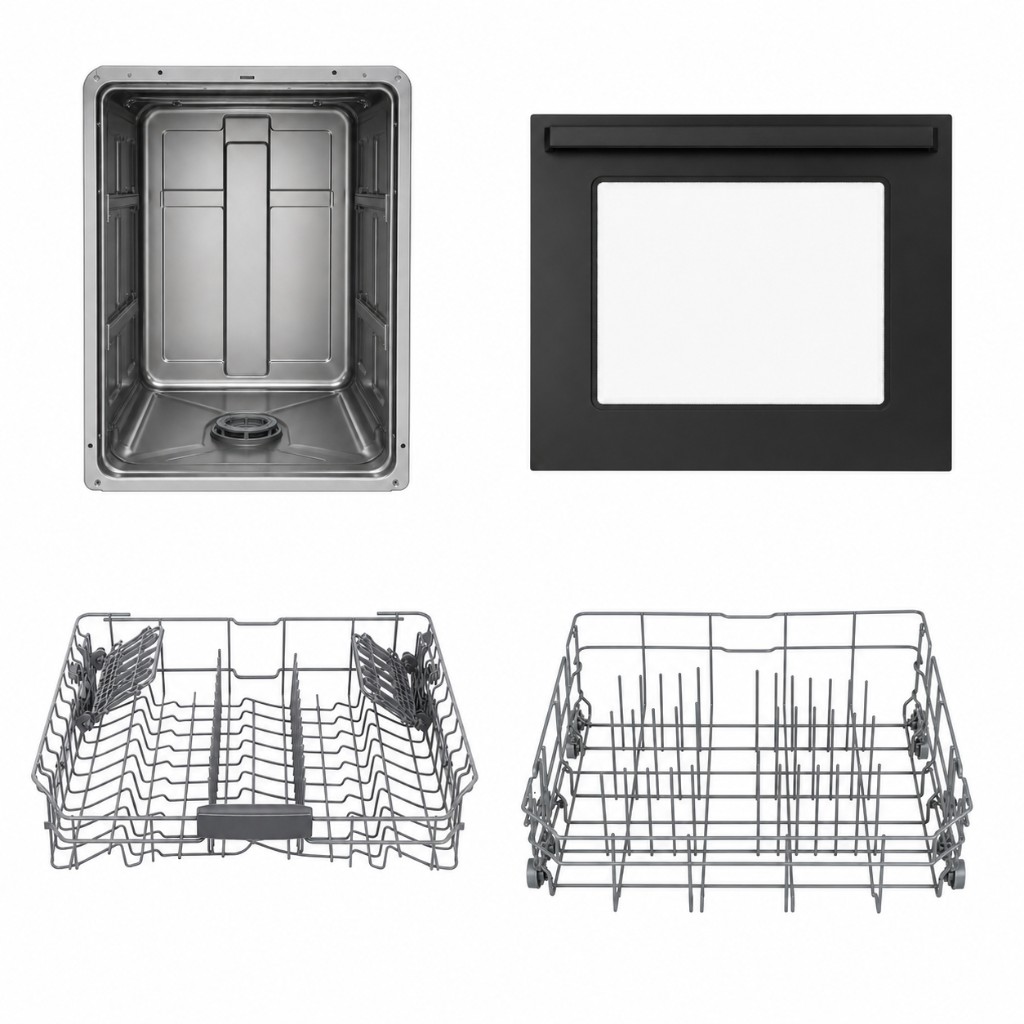
Step 3: Mesh generation. Image-to-3D ran on each render and produced one mesh per part—body, front door, upper rack, and lower rack.
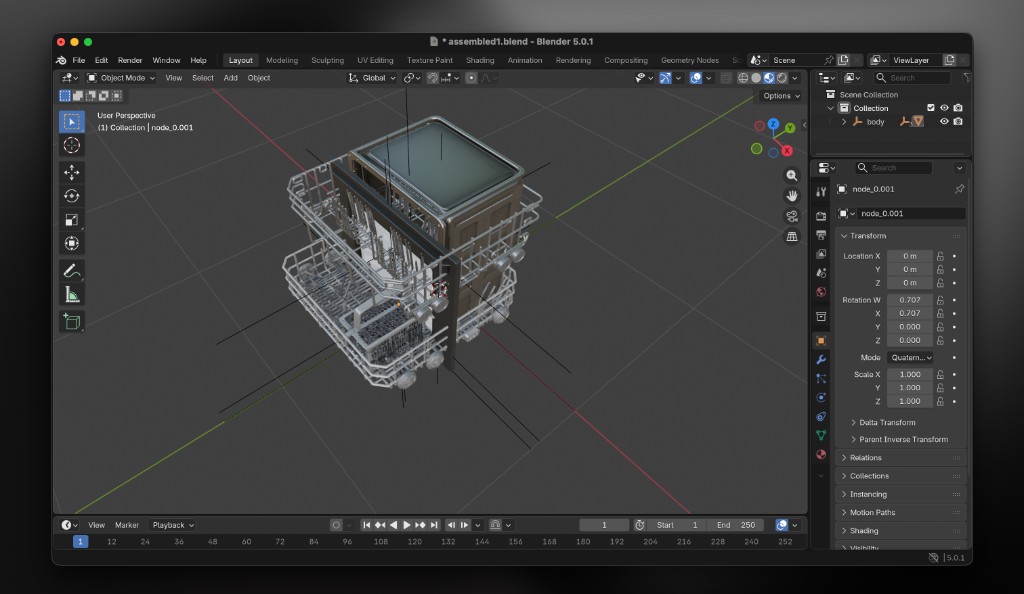
Steps 4 and 5: Placement and critique loop. A deterministic placement step wrote the first layout. Each subsequent round, Blender assembled the parts and rendered diagnostic views; the critic subagent scored the result against the reference image and returned structured fixes for the next round. The score moved from 45 at iteration 1 to 82 at iteration 6, on an internal 0 to 100 scale.
At iteration 1 the assembly had significant errors: the door was upright instead of open and flat, both racks extended past the body edges, and the lower rack was not resting on the door. The critic subagent flagged the rotation, scale, and collision issues; the next round incorporated those corrections.
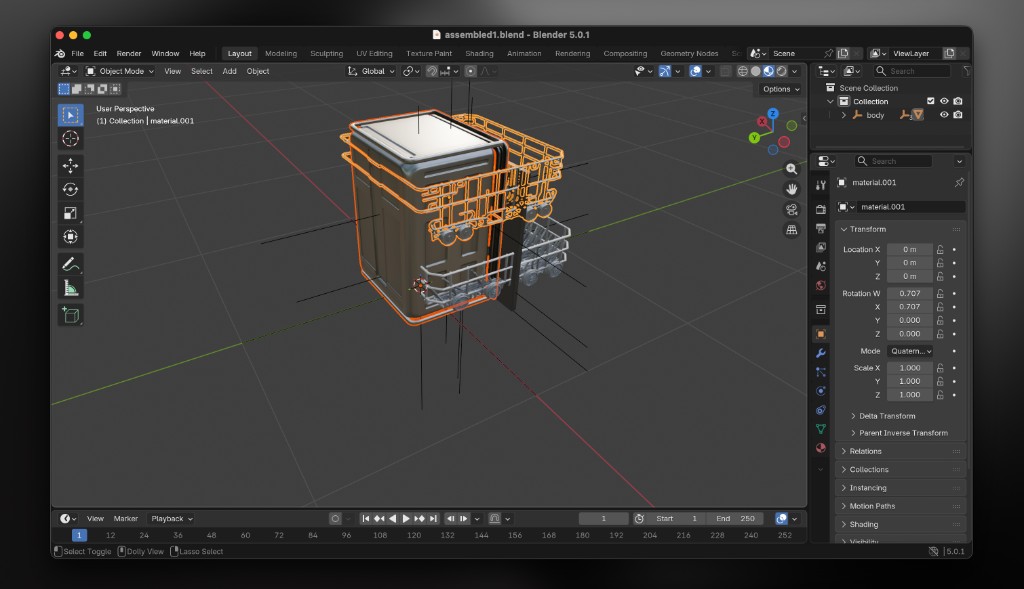
By iteration 6 the layout matched the reference photo. The door lay flat and open below the racks, both racks sat inside the body without intersecting the walls, and proportions were consistent with the source image. The critic subagent locked the main links and flagged only minor depth adjustments.
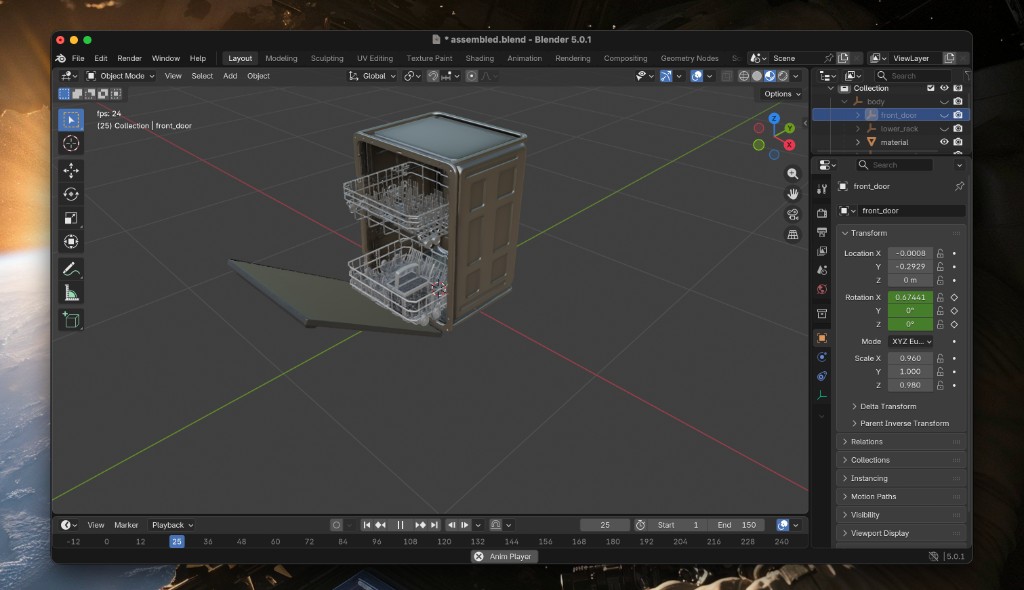
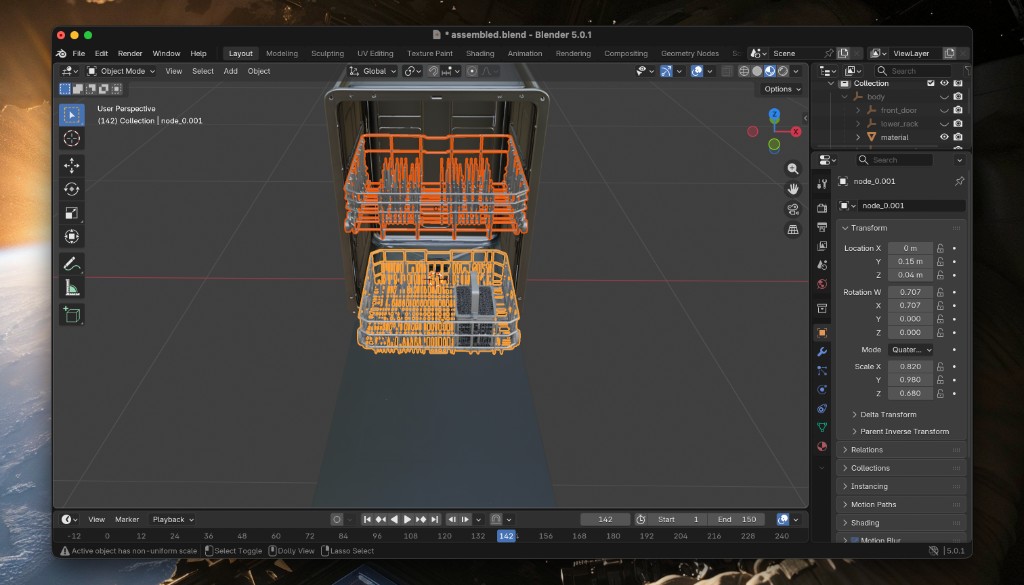
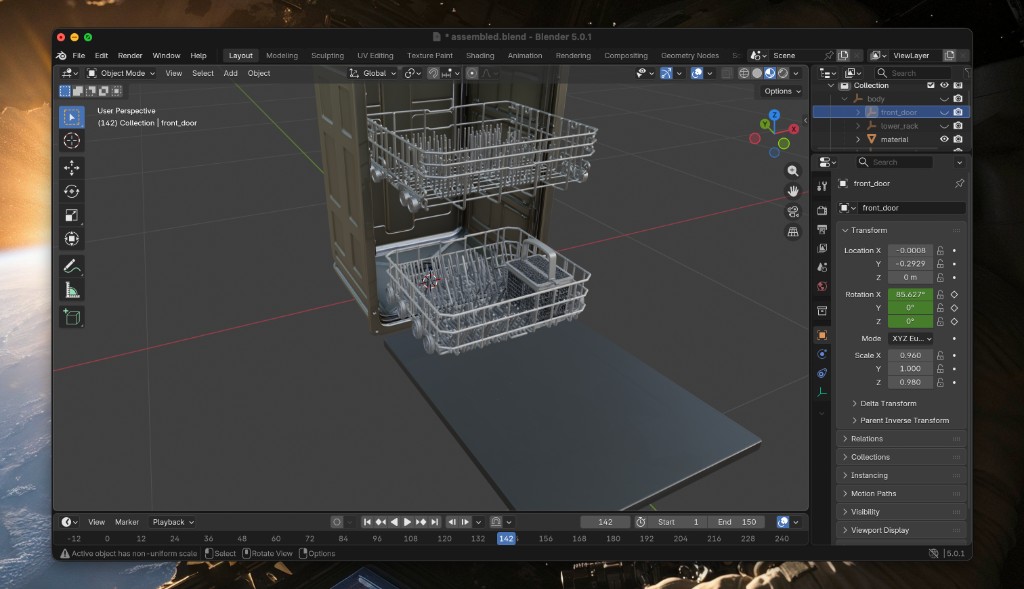
Steps 6 and 7: Layout approval and export. After the critic loop, I reviewed the best iteration at the second human gate and approved the layout. Joint types had already been set during part identification—a revolute joint for the door, prismatic joints for both racks. The orchestrator exported the approved scene as a USD package. Joint motion was verified in Blender before the final export.
3.3 Example Assets
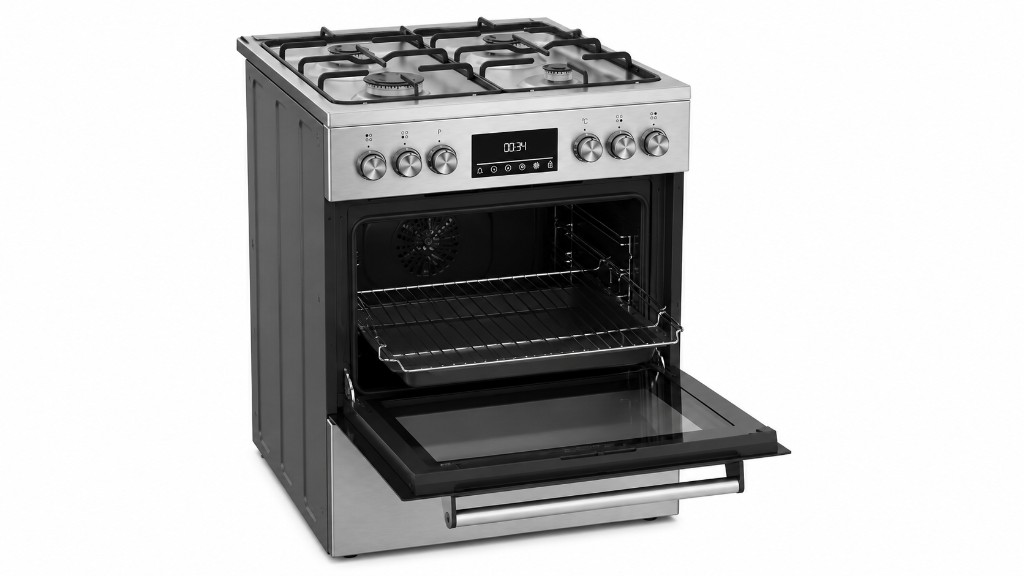
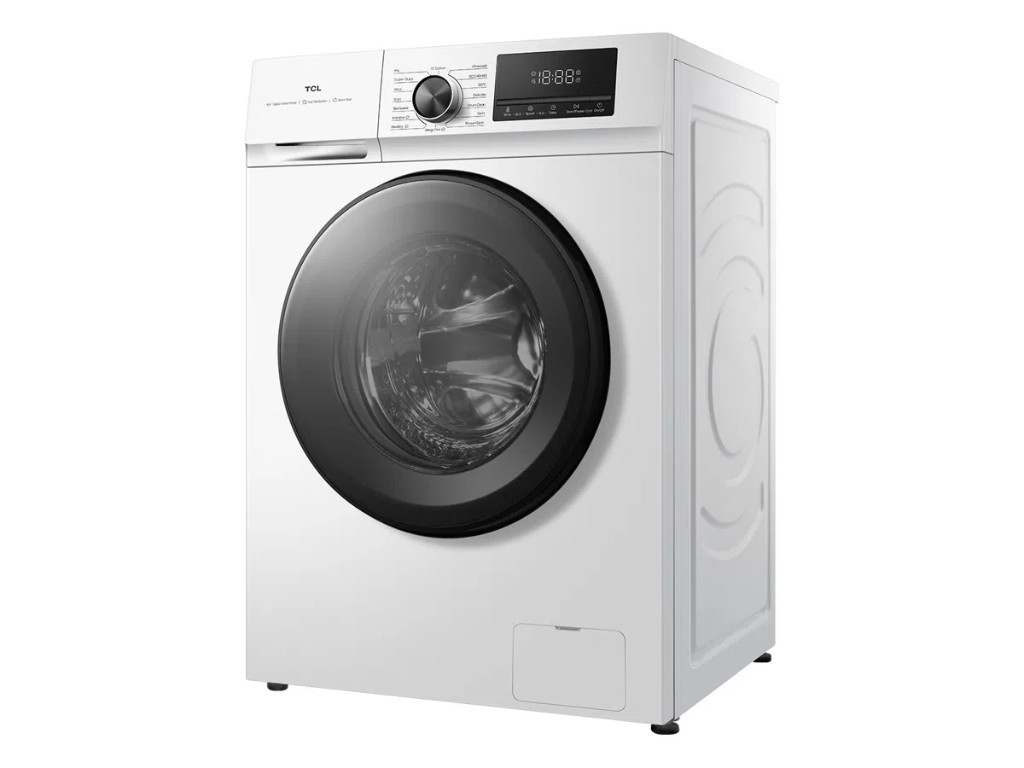
These are articulated assets Dexter generated from product photos—each with separate moving parts, joint definitions, and a URDF/USD export package. The dishwasher run in §3.2 walks through one of these in full detail; the refrigerator run is captured in the video in §3.1.
-
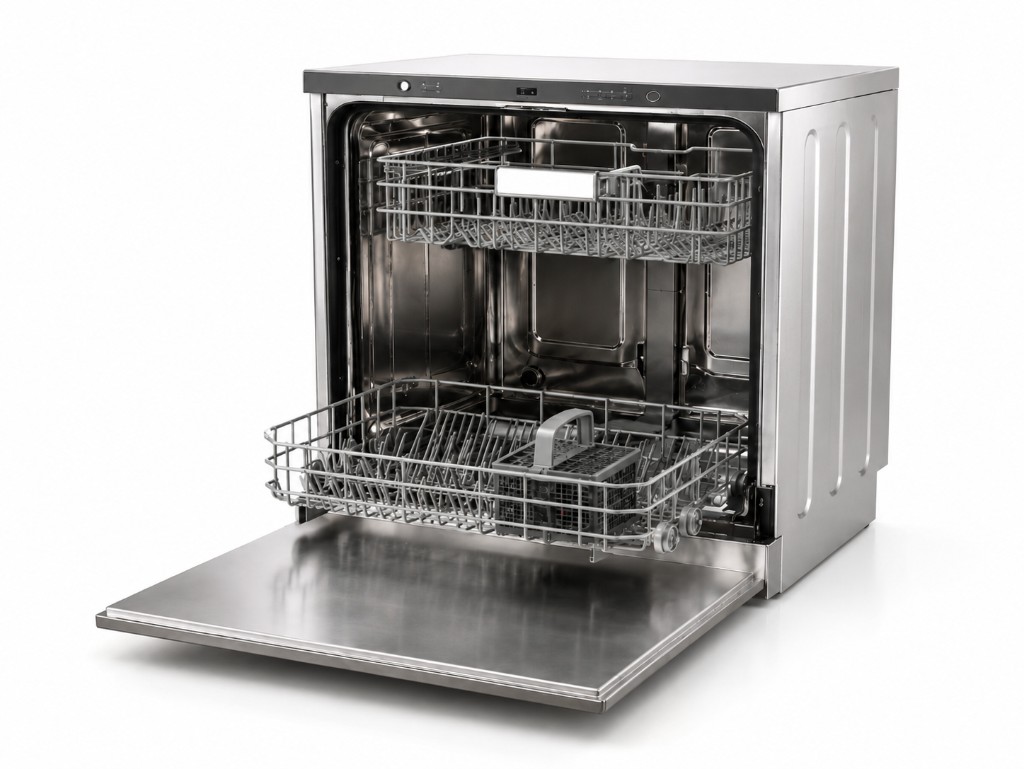 Dishwasher
-
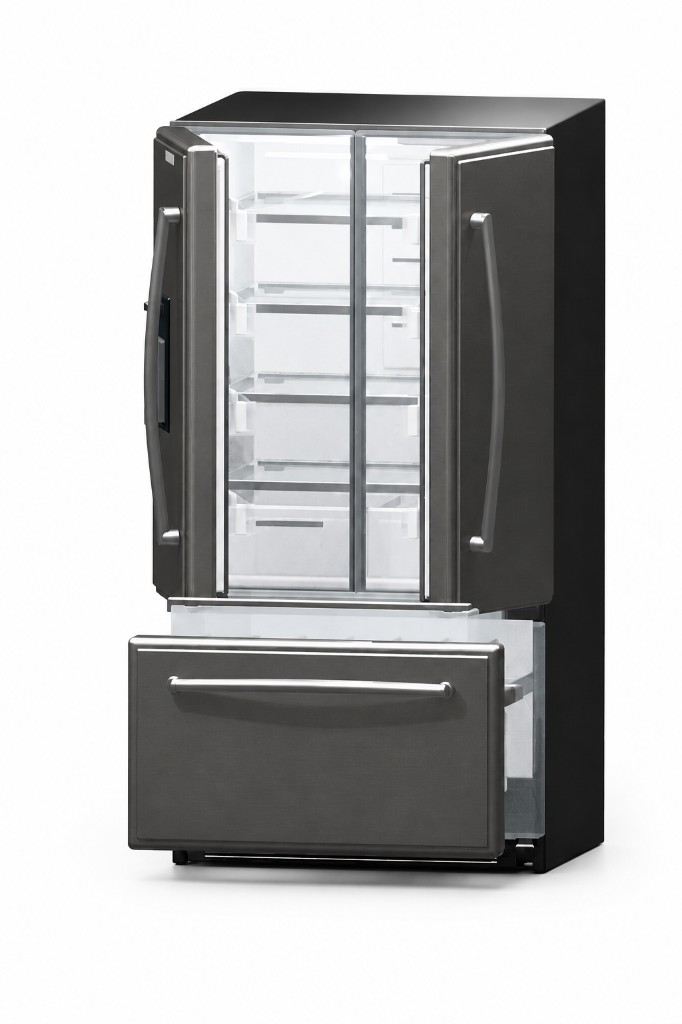 Refrigerator
-
 Oven
Oven
-
 Washing machine
Download sample outputs. You can download and verify these example runs—including robot.usda, per-part meshes, iteration artifacts, and intermediate JSON—from the Dexter sample outputs dataset on Hugging Face. The code is open source and free to use: github.com/aakashvarma/dexter
huggingface-cli download varmology/dexter-sample-outputs --repo-type dataset --local-dir ./dexter-sample-outputs
4. Conclusion
v0 handles one object per run with two human gates and render-based layout critique. Assets need joint tuning after Isaac Sim import. The parts gate before 3D generation, the placement ↔ critic loop, and physics-viewer joint validation were the three decisions that held up in practice.
The subagent nodes are not yet fault-tolerant; a node that produces a weak IR passes it forward silently. Stateful nodes with backtracking and retry logic are the main gap. The scope is intentionally narrow for now; full scene generation from a single description is the longer-term direction.
A Note on Building This
Dexter was built for the joy of experimenting.
I chose OpenCode as the harness because it keeps the loop easy to reason about. Each subagent is a discrete node. You can swap one out, change the exit condition on the placement ↔ critic loop, or insert a new gate without touching the rest of the graph. That made it fast to iterate while the stage order was still in flux.
Dexter v0 is intentionally prompt-orchestrated: the model determines routing, branching, and exit conditions. That makes it fast to experiment with the loop structure and validate the stage graph before committing to anything hardened. Once you know the stages are right, the natural next step is replacing prompt-based orchestration with an explicit graph: fixed transitions, deterministic branching, and typed IRs at each edge. A structured graph saves tokens, removes a source of hallucination and routing error, and makes the pipeline auditable. Think of v0 as a PoC for the loop; a production version would run the same stages as a proper state machine.
5. Glossary
Articulated asset. A 3D object modeled as multiple rigid links connected by joints with defined axes and limits, as opposed to a single fused mesh.
URDF (Unified Robot Description Format). An XML format for describing robots and objects as a kinematic tree of links and joints. Widely used in ROS and supported by Isaac Sim.
USD (Universal Scene Description). The scene format used by Isaac Sim via Omniverse. Supports articulation, materials, lighting, and multi-object scenes in a single file.
VLA (Vision-Language-Action model). A model that takes camera frames and a language instruction as input and outputs robot motor commands. Examples include π0 and π0.5 from Physical Intelligence.
Isaac Sim. NVIDIA’s robotics simulation platform built on Omniverse and PhysX. A downstream consumer of the URDF/USD packages Dexter produces.
Parts IR. Structured output of the analyze subagent: the part list and kinematic tree, approved by a human gate before 3D generation begins.
Layout IR. Structured description of where each part sits in 3D space—position, orientation, and scale.
Critique IR. Structured output of the critic subagent: a score and per-part layout fixes.
Harness. A control loop around an LLM that manages tool calls, context, and state between steps. OpenCode is the harness Dexter runs through.
6. References
[1] Physical Intelligence. Company website. https://www.physicalintelligence.company/
[2] Physical Intelligence. (2024). "π0: A Vision-Language-Action Flow Model for General Robot Control." Physical Intelligence Blog. https://www.pi.website/blog/pi0
[3] NVIDIA. NVIDIA Omniverse. https://www.nvidia.com/en-us/omniverse/
[4] NVIDIA. Isaac Sim. Robotics simulation platform. https://developer.nvidia.com/isaac/sim
[5] NVIDIA. "Importing URDF Files." Isaac Sim Documentation. https://docs.isaacsim.omniverse.nvidia.com/latest/importer_exporter/import_urdf.html
[6] Genesis AI. Genesis World Documentation. https://genesis-world.readthedocs.io/
[7] Moonlake AI. Company website. https://moonlakeai.com/
[8] Physical Intelligence. (2025). "π0.5: A VLA with Open-World Generalization." Physical Intelligence Blog. https://www.pi.website/blog/pi05
[9] Raschka, S. (2026). "Components of a Coding Agent." Ahead of AI. https://magazine.sebastianraschka.com/p/components-of-a-coding-agent
[10] Varma, A. Dexter (open source). GitHub Repository. https://github.com/aakashvarma/dexter